
Dawson Oaks Trailer Park Controls
Playtest prompts, HUD meters, and full controller support — bindings can still change before 17 September 2026.
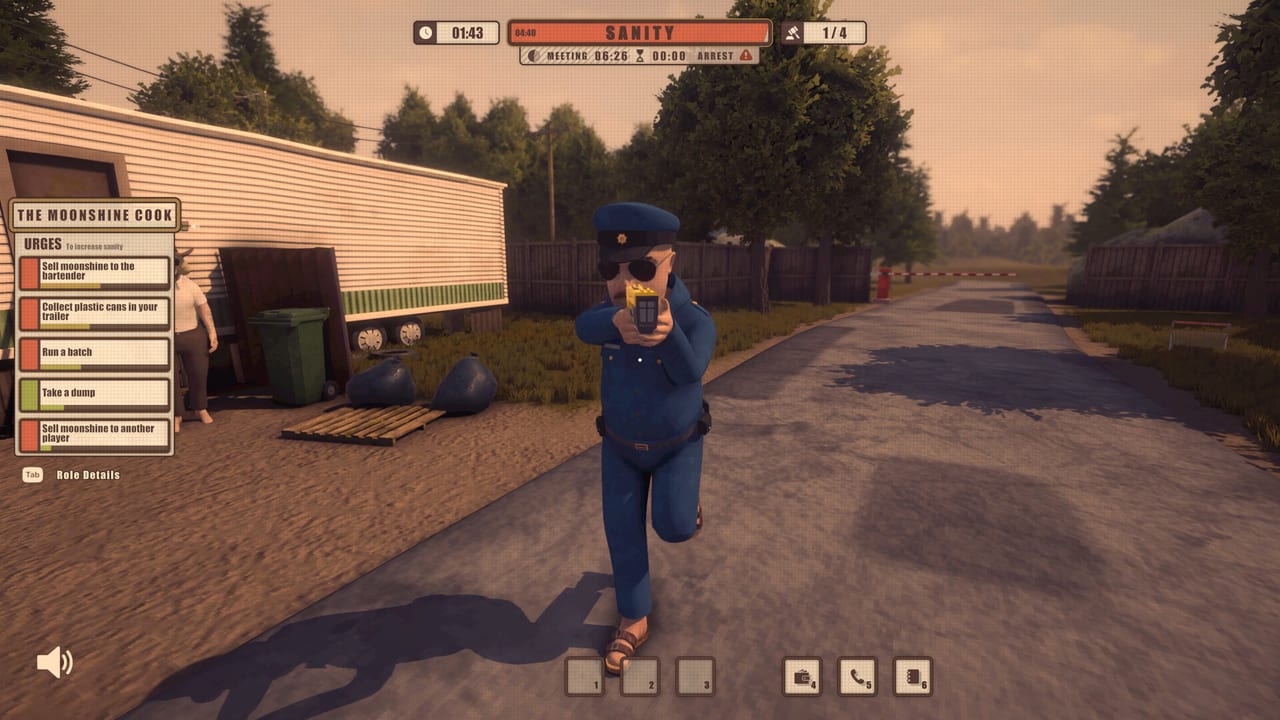
Dawson Oaks Trailer Park is a first-person proximity-voice game, not a menu fighter. The important inputs are the ones painted on screen when you look at a bag, a bottle, a body, or a door. This page lists the prompts seen in official playtest screenshots and recordings. It is not a shipped manual. Striped Panda Studios can still remap keys before the Windows Steam launch on 17 September 2026. Steam already lists full controller support, so a pad is a valid way to walk the park, even if we do not invent button glyphs the UI has not shown.
If you have not learned why these keys matter, read how the match loops first. A perfect bind will not save a Junkie who smokes in the Supervisor’s face. New players can pair this page with the beginner lobby walkthrough. Confirm Windows specs on the tools hub if the game even refuses to boot.
Prompts seen in playtests
| Action | Playtest prompt |
|---|---|
| Pick up | E |
| Drop | G |
| Drink, throw, or smoke | C |
| Role Details | Tab |
| Hotbar items | 1, 2, 3 |
| Flip phone | Slot 5 |
| Wallet / camera | HUD inventory, not a separate keycard |
E is the world key. Bags, plastic cans, bottles, and props on counters use it. G dumps whatever you should not be holding when the cop turns the corner. C is the consume and toss key: drink, throw, smoke, depending on what the left-panel urge asked for. If the crime banner is up, C is how you finish incriminating yourself, so look at the doorway first.
Tab is Role Details. Open it when voice chat is loud and you cannot remember whether you are the cook or the cover story. Do not read the card out loud. Snitches live on leaked knowledge; the Snitch-hunting meeting guide is built on people who recite information they should not have. Tab is private. Voice is not.
HUD meters that behave like controls
The top of the screen is a second keyboard. SANITY tells you when the next urge is mandatory. A Meeting timer tells you when to walk to the Community Center. An Arrest timer tells you the Supervisor has committed. A gavel counter shown in playtests as a fraction such as 1/4 tracks how much hall politics you have left. Status chips (High, Luck, Piss, BEING NEAR THE SUPERVISOR) are the reason you stop pressing C.
Hotbar slots 1-3 are physical props: zip bags, cans, moonshine, whatever the trade window just handed you. The wallet is money for $1 Increase and Decrease offers. The camera is a prop, not a spectator mode. Slot 5 is the flip phone. Supervisor players use the Parachite brand to place calls; everyone else still has a phone-shaped tell if they hold it in a doorway. Cop-specific timing lives in the Supervisor playbook.
Objective markers with distances (HOME TRAILER, BATHTUB, STEREO, MEETING) are navigation, not keybinds. Face them, walk, then use E or C when the prompt appears. The park map and landmarks explains which rooms those markers actually mean. Pressing keys in the street next to the nametag is how you skip the map and go straight to Community Service.
Voice, proximity, and what not to bind to your mouth
There is no documented push-to-talk key in the screenshots we trust, so this wiki will not invent one. Steam’s store promise is proximity voice chat. If someone is out of earshot, they should not hear the deal. If someone is in the kitchen, they hear everything, including the crime banner you just triggered. Treat your microphone as an always-on tell. The stealth crime walkthrough is mostly about shutting up while C is held.
Controller support is real. Expect the same actions (pick up, drop, consume, role card, hotbar, phone) on a pad with on-screen prompts, the way the keyboard already paints E, G, and C. Do not memorize a fan-made glyph chart. Wait for the in-game legend. If a prompt appears that this table does not list, believe the prompt.
Settings you should settle before the first urge
Sensitivity, fullscreen, and audio levels are the unglamorous binds that lose meetings. You need to hear footsteps on porches and still understand a vote in the Community Center Main Room. You need to turn without throwing the camera into a bathtub. None of that is a unique Dawson Oaks invention, but the park punishes it because the Supervisor only needs line of sight, not a perfect crosshair.
Host online or over LAN with those settings already saved. Do not open the options menu during an Arrest timer. Do not tab out of Role Details in the middle of a meeting countdown. When the key list updates at launch, this page will follow studio notes rather than guessing. Until then, use E, G, C, Tab, 1-3, and slot 5, and keep your mouth off the urge list.
For the rest of the tutorials, return to the Guides Hub. Controls are how you touch the park. They are not how you win it.
Frequently Asked Questions
Quick answers about roles, meetings, and the Steam launch.
What are the main keyboard prompts in Dawson Oaks Trailer Park?
Playtests showed E to pick up, G to drop, C to drink, throw, or smoke, and Tab for Role Details. Hotbar 1-3 holds items; slot 5 is the flip phone. The list can still change before launch.
Is there controller support?
Yes. Steam lists full controller support. Use on-screen prompts rather than a fan glyph chart. Confirm system requirements if a pad is not detected.
What does Tab show?
Role Details: your card, including a Snitch cover plus private urges if you have them. Keep that text out of proximity chat so meetings cannot hunt you for leaked knowledge.
Where do I use these keys without getting arrested?
Trailer interiors first, streets last. Pair this page with how not to get caught and the map.